mkdir unix_workshopIntroduction to Unix Command-line
Part 1
Natalie Gill
Gladstone Bioinformatics Core
March 09, 2025
Introductions
Natalie Gill
Bioinformatician II
The Unix Command-line
What is Unix?
- A family of operating systems that date back to 1970s
- Designed to run on different types of computer hardware
- macOS and Linux are descendants of Unix
- Often used in industry and scientific research
What is the Command-line?
- A text-based interface for interacting with the operating system
- Execute commands to perform various tasks like:
- Navigating the file system
- Editing files
- Command-line interfaces (CLIs) are how users interacted with computers before graphical interfaces like Windows
Advantages of using CLIs
- Allows for automation and batch processing of data
- Provides more control and flexibility over data manipulation
- Interact with High-Performance Computing clusters (HPCs) like Wynton
- Speed
The Terminal
The software that provides access to the CLI
Open your terminal
- Mac: press Cmd + Space and type “terminal”
- Linux: press Ctrl+Alt+T
- Windows: open the Ubuntu app
Download the workshop materials
- Copy and paste each of these into your terminal, press enter after each one:
The shell
- A shell is a specific type of CLI that provides access to the OS as a whole
- There are several different Unix shells
- Bash : The most widely used and the default shell on most Linux systems
- Zsh : an extended version of Bash and is now the default on newer versions of macOS
The shell
- Check which shell you are using by typing:
- We will use bash since it is the most widely used shell
- If your shell is not set to bash, type
chsh -s /bin/bashand press enter
Commands
Shell commands are basic instructions used to perform specific tasks.
command_name -[option(s)] [argument(s)]
Example:
Here we are providing multiple options to the ls command and the directory part_1 as an argument
- To cancel a command press CTRL+C
man: pull up the manual page for a command
ECHO(1)             General Commands Manual            ECHO(1)

NAME
     echo – write arguments to the standard output

SYNOPSIS
     echo [-n] [string ...]

DESCRIPTION
     The echo utility writes any specified operands, separated by single blank
     (‘ ’) characters and followed by a newline (‘\n’) character, to the
     standard output.

     The following option is available:

     -n    Do not print the trailing newline character.  This may also be
       achieved by appending ‘\c’ to the end of the string, as is done by
       iBCS2 compatible systems.  Note that this option as well as the
       effect of ‘\c’ are implementation-defined in IEEE Std 1003.1-2001
       (“POSIX.1”) as amended by Cor. 1-2002.  Applications aiming for
       maximum portability are strongly encouraged to use printf(1) to
       suppress the newline character.

     Some shells may provide a builtin echo command which is similar or
     identical to this utility.  Most notably, the builtin echo in sh(1) does
     not accept the -n option.  Consult the builtin(1) manual page.

EXIT STATUS
     The echo utility exits 0 on success, and >0 if an error occurs.

SEE ALSO
     builtin(1), csh(1), printf(1), sh(1)

STANDARDS
     The echo utility conforms to IEEE Std 1003.1-2001 (“POSIX.1”) as amended
     by Cor. 1-2002.

macOS 14.4          April 12, 2003              macOS 14.4
Manual pages
Use the arrow keys to navigate the manual and press q to close it
MAN(1)              General Commands Manual         MAN(1)

NAME
     man, apropos, whatis – display online manual documentation pages

SYNOPSIS
     man [-adho] [-t | -w] [-M manpath] [-P pager] [-S mansect]
     [-m arch[:machine]] [-p [eprtv]] [mansect] page ...

     man -f [-d] [-M manpath] [-P pager] [-S mansect] keyword ...
     whatis [-d] [-s mansect] keyword ...

     man -k [-d] [-M manpath] [-P pager] [-S mansect] keyword ...
     apropos [-d] [-s mansect] keyword ...

DESCRIPTION
     The man utility finds and displays online manual documentation pages.  If
     mansect is provided, man restricts the search to the specific section of
     the manual.

     The sections of the manual are:
       1.   General Commands Manual
       2.   System Calls Manual
       3.   Library Functions Manual
       4.   Kernel Interfaces Manual
       5.   File Formats Manual
       6.   Games Manual
       7.   Miscellaneous Information Manual
       8.   System Manager's Manual
       9.   Kernel Developer's Manual

     Options that man understands:

     -M manpath
         Forces a specific colon separated manual path instead of the
         default search path.  See manpath(1).  Overrides the MANPATH
         environment variable.

     -P pager
         Use specified pager.  Defaults to “less -sR” if color support is
         enabled, or “less -s”.  Overrides the MANPAGER environment
         variable, which in turn overrides the PAGER environment variable.

     -S mansect
         Restricts manual sections searched to the specified colon
         delimited list.  Defaults to “1:8:2:3:3lua:n:4:5:6:7:9:l”.
         Overrides the MANSECT environment variable.

     -a      Display all manual pages instead of just the first found for each
         page argument.

     -d      Print extra debugging information.  Repeat for increased
         verbosity.  Does not display the manual page.

     -f      Emulate whatis(1).  Note that only a subset of options will have
         any effect when man is invoked in this mode.  See the below
         description of whatis options for details.

     -h      Display short help message and exit.

     -k      Emulate apropos(1).  Note that only a subset of options will have
         any effect when man is invoked in this mode.  See the below
         description of apropos options for details.

     -m arch[:machine]
         Override the default architecture and machine settings allowing
         lookup of other platform specific manual pages.  This option is
         accepted, but not implemented, on macOS.

     -o      Force use of non-localized manual pages.  See IMPLEMENTATION
         NOTES for how locale specific searches work.  Overrides the
         LC_ALL, LC_CTYPE, and LANG environment variables.

     -p [eprtv]
         Use the list of given preprocessors before running nroff(1) or
         troff(1).  Valid preprocessors arguments:

         e       eqn(1)
         p       pic(1)
         r       refer(1)
         t       tbl(1)
         v       vgrind(1)

         Overrides the MANROFFSEQ environment variable.

     -t      Send manual page source through troff(1) allowing transformation
         of the manual pages to other formats.

     -w      Display the location of the manual page instead of the contents
         of the manual page.

     Options that apropos and whatis understand:

     -d      Same as the -d option for man.

     -s      Same as the -S option for man.

     When man is operated in apropos or whatis emulation mode, only a subset
     of its options will be honored.  Specifically, -d, -M, -P, and -S have
     equivalent functionality in the apropos and whatis implementation
     provided.  The MANPATH, MANSECT, and MANPAGER environment variables will
     similarly be honored.

IMPLEMENTATION NOTES
   Locale Specific Searches
     The man utility supports manual pages in different locales.  The search
     behavior is dictated by the first of three environment variables with a
     nonempty string: LC_ALL, LC_CTYPE, or LANG.  If set, man will search for
     locale specific manual pages using the following logic:

       lang_country.charset
       lang.charset
       en.charset

     For example, if LC_ALL is set to “ja_JP.eucJP”, man will search the
     following paths when considering section 1 manual pages in
     /usr/share/man:

       /usr/share/man/ja_JP.eucJP/man1
       /usr/share/man/ja.eucJP/man1
       /usr/share/man/en.eucJP/man1
       /usr/share/man/man1

   Displaying Specific Manual Files
     The man utility also supports displaying a specific manual page if passed
     a path to the file as long as it contains a ‘/’ character.

ENVIRONMENT
     The following environment variables affect the execution of man:

     LC_ALL, LC_CTYPE, LANG
             Used to find locale specific manual pages.  Valid values
             can be found by running the locale(1) command.  See
             IMPLEMENTATION NOTES for details.  Influenced by the -o
             option.

     MACHINE_ARCH, MACHINE
             Used to find platform specific manual pages.  If unset,
             the output of “sysctl hw.machine_arch” and “sysctl
             hw.machine” is used respectively.  See IMPLEMENTATION
             NOTES for details.  Corresponds to the -m option.

     MANPATH         The standard search path used by man(1) may be changed by
             specifying a path in the MANPATH environment variable.
             Invalid paths, or paths without manual databases, are
             ignored.  Overridden by -M.  If MANPATH begins with a
             colon, it is appended to the default list; if it ends
             with a colon, it is prepended to the default list; or if
             it contains two adjacent colons, the standard search path
             is inserted between the colons.  If none of these
             conditions are met, it overrides the standard search
             path.

     MANROFFSEQ      Used to determine the preprocessors for the manual source
             before running nroff(1) or troff(1).  If unset, defaults
             to tbl(1).  Corresponds to the -p option.

     MANSECT         Restricts manual sections searched to the specified colon
             delimited list.  Corresponds to the -S option.

     MANWIDTH        If set to a numeric value, used as the width manpages
             should be displayed.  Otherwise, if set to a special
             value “tty”, and output is to a terminal, the pages may
             be displayed over the whole width of the screen.

     MANCOLOR        If set, enables color support.

     MANPAGER        Program used to display files.

             If unset, and color support is enabled, “less -sR” is
             used.

             If unset, and color support is disabled, then PAGER is
             used.  If that has no value either, “less -s” is used.

FILES
     /etc/man.conf
         System configuration file.
     /usr/local/etc/man.d/*.conf
         Local configuration files.

EXIT STATUS
     The man utility exits 0 on success, and >0 if an error occurs.

EXAMPLES
     Show the manual page for stat(2):

       $ man 2 stat

     Show all manual pages for ‘stat’.

       $ man -a stat

     List manual pages which match the regular expression either in the title
     or in the body:

       $ man -k '\<copy\>.*archive'

     Show the manual page for ls(1) and use cat(1) as pager:

       $ man -P cat ls

     Show the location of the ls(1) manual page:

       $ man -w ls

SEE ALSO
     apropos(1), intro(1), mandoc(1), manpath(1), whatis(1), intro(2),
     intro(3), intro(3lua), intro(4), intro(5), man.conf(5), intro(6),
     intro(7), mdoc(7), intro(8), intro(9)

macOS 14.4          January 9, 2021             macOS 14.4
echo: print a string or value of a variable
- Variables : a named container that holds a value or data
- Strings : sequence of characters
Here, we assign the string “Hello, World!” to the variable message and use echo to print its value.
history: list previously run commands
- You can also cycle through previously run commands using the up and down arrow keys
- By default bash stores the last 500 commands, zsh stores the last 1000
- Use the command
clearto clear the output from the terminal
Navigating the File System
The File System
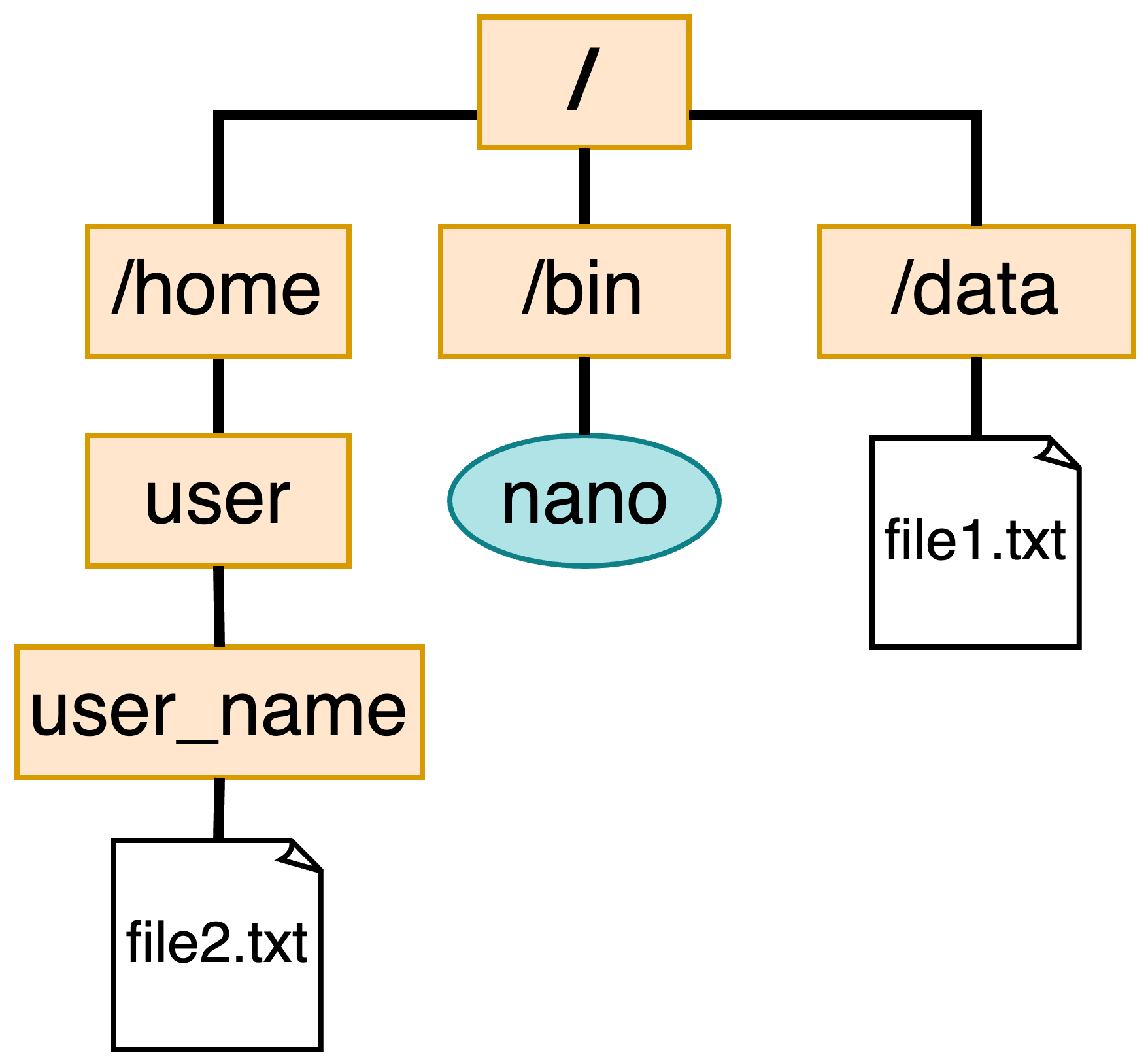
Paths
- Root directory
/ - Current working directory
. - Directory above the current one
.. - User home directory
~ - Absolute: The path starting from root
/data/file1.txt
- Relative: Path from the current directory
./file1.txt
pwd: print working directory
/Users/your_username/unix_workshop- The default working directory when you log in or open a terminal is your user home directory
~
ls: list contents of a directory
-lshow more information (file permissions and size)-ashow all (hidden files)-hfile sizes in human readable format (e.g., 1K, 2G)
cd: move to a directory
total 8
-rw-r--r--@ 1 nelphick staff 60 Apr 12 2023 list_numbers.tsvtotal 8
drwx---r--@ 4 nelphick staff 128 Mar 9 11:14 part_1
drwxr-xr-x@ 3 nelphick staff 96 Mar 9 11:15 part_2
-rw-r--r-- 1 nelphick staff 1790 Nov 11 10:43 unix_workshop.tar.gzCreating and Altering Files
File Permissions
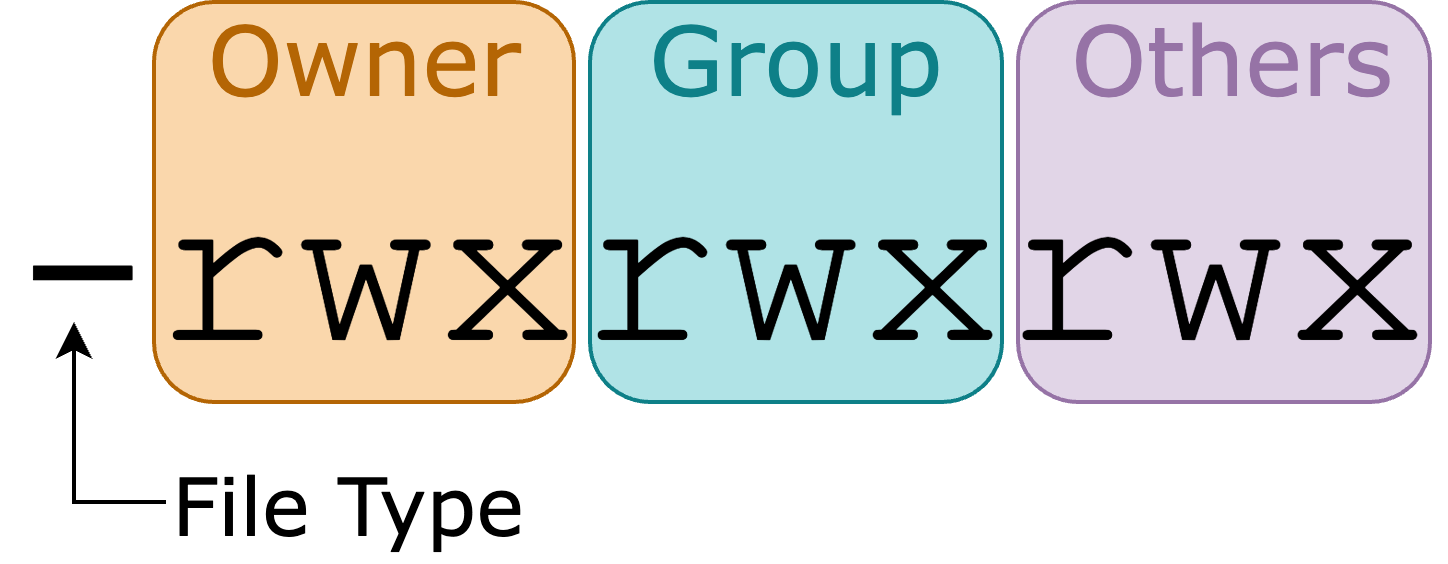
- Permissions for a file or folder are represented by 10 characters
- Each group of 3 represents the permissions for different users:
- Owner of the file/folder
- Group the owns the file
- Others - everyone else
File Permissions
- There are three types of permissions:
- r - read/view the contents of a file/folder
- w - write
- x - execute the file or access a directory
touch: create an empty file
- If the file exists, it will update the time stamp
mkdir: make a directory
-pmake parent directories if they don’t exist
mv: move a file or folder
- Also used to rename files/folders
cp: copy a file or folder
-rto copy a folder (recursive)
rm: remove a file permanently
- This command should always be used with care since the files it is used on cannot be recovered
du: check the size of a file or folder
- h - Displays the output in human readable format
Text editors
- Command-line text editors provide lots of key board shortcuts to navigate and alter files
- Some commonly used ones are:
- Vim : Feature rich, steep learning curve
- nano : Simple and user friendly
nano
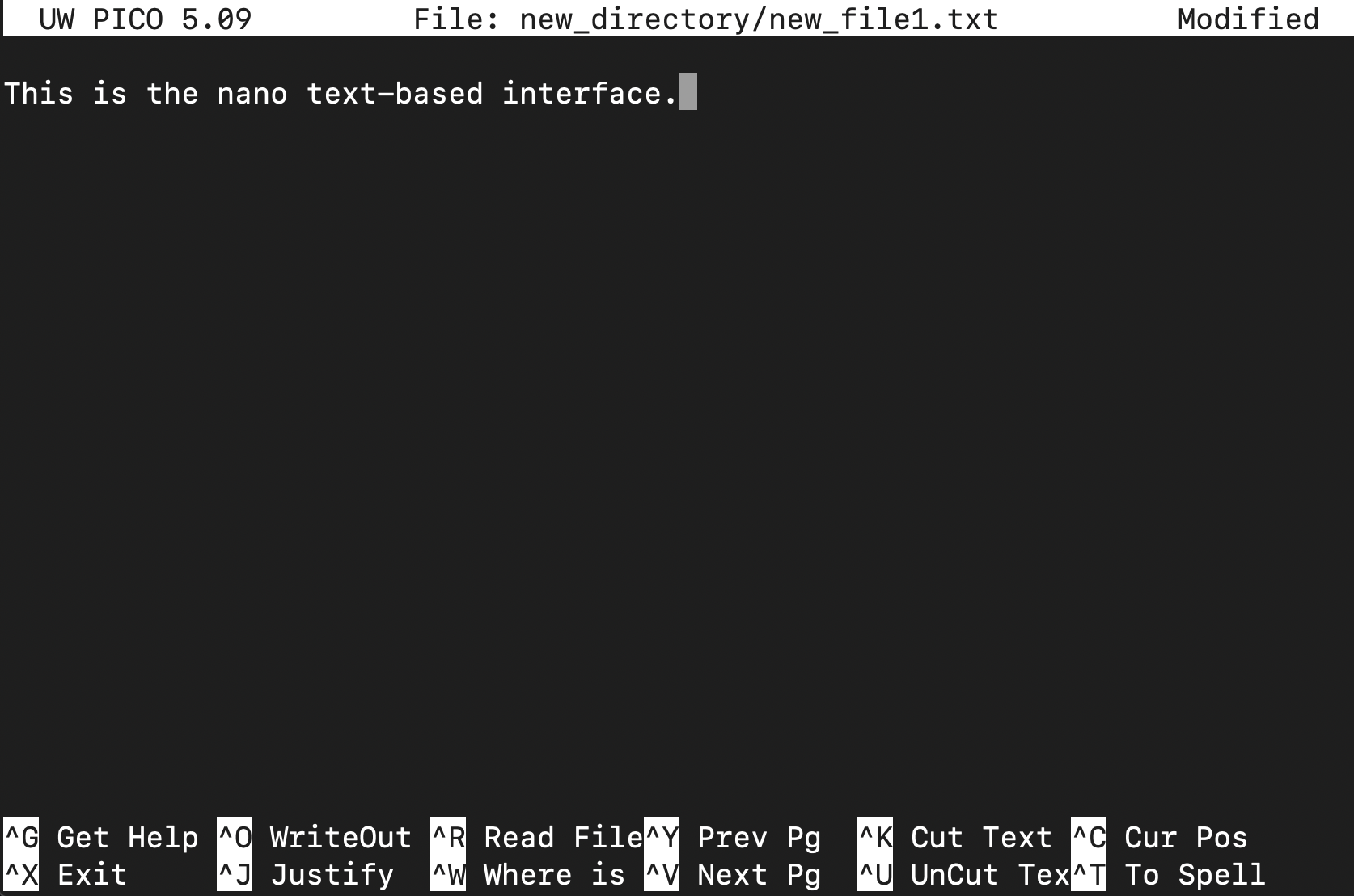
Shortcuts for nano
- Ctrl + X : Exit nano
- Ctrl + O : Save the file (write Out)
- Ctrl + W : Search for a string or regular expression
- Ctrl + K : Cut (remove) the current line or selection
- Ctrl + U : Uncut (paste) the most recently cut text
- Ctrl + A : Move the cursor to the start of the current line
- Ctrl + E : Move the cursor to the end of the current line
- Ctrl + G : Show the help menu
Installing Software
Package managers
Used to install and manage software
macOS
- homebrew - not included with the OS and needs to be installed
WSL/Linux
- apt-get - included with Ubuntu
We will not install any software in this workshop but these are how you would access additional software/commands.
Downloading Files
curl: download files from the internet
- We used curl at the begining download the materials
- curl supports multiple protocols but the most commonly used one is HTTPS
-ogives the output file name and location
Other file transfer tools
- wget : like curl, supports fewer protocols and is not always installed
- scp (secure copy) : used to encrypt and transfer files using SSH protocol
- Commonly used to transfer files on HPCs (Wynton) Example:
Searching Files and Combining Commands
grep: searching files with regular expressions
Search the contents of the input file and returns the lines that have a match
Regular Expressions : sequence of characters that forms a search pattern
grep options
- -i : ignore case
- -v : invert match
- -r : recursively searches in all files and subdirectories of a directory
- -c : counts the number of matches found in each file
Regular Expressions
- For a more extensive overview of regular expressions click here
- Some basic ones are:
- ” ^ ” Matches the beginning of a line
- ” . ” Matches any single character except newline
- ” $ ” Matches the end of a line
head/tail: view the first or last n lines of a file
- The default n is 10
- Useful for getting a look at the format of a file
cat: print the contents of a file
cut: get specific columns from a file
- -f : fields that should be returned
- -d : delimiter - character that the columns are separated by
By default cut expects columns to be separated by tab characters.
Combining Commands
- Pipes “|” connect one command to another
- The output of the previous command is used as the input for the next one
- Chaining commands allows you to do complex operations on text streams
Output to a file
- The output of any command can be written to a file with the ” > ” character
tr: translate or substitute characters
sort: sort values
- -n : sort numerically (default is alphabetical)
- -u : sort and remove duplicates
End of Part 1
Notes on Using AI for UNIX CLI
- AI tools (ChatGPT, Claude, Gemini) can help generate, explain, and debug Unix commands
- Always verify AI-generated commands before running them, especially destructive ones (rm, mv)
- AI can hallucinate flags or options — confirm with
manor--help - Provide context for better results: your shell, OS, and goal
- If you can’t explain what a command does, don’t run it
- See the Gladstone Bioinformatics Core position paper on responsible use of AI in bioinformatics: link
Other helpful commands
wc: count lines and wordschmod: Change the permissions of a file or directorychown: Change the owner of a file or directorydf: Display information about disk usage and available spaceps: Display information about running processeskill: Stop a running processless: View the contents of a file one page at a timedate: prints the date and timecurl wttr.in: check the weather
Workshop survey
- If you are not attending part 2, please fill out our workshop survey so we can continue to improve these workshops
Additional learning materials
- Learn Regular Expressions:
- Software carpentry provides a self paced course:
- Free online books:
Upcoming Data Science Training Program Workshops
Working on Wynton
March 16-March 17, 2026 9:00am-12:00pm PDT
Introduction to Pathway Analysis
March 19, 2026 1:00-4:00pm PDT
Statistics of Enrichment Analysis Methods
March 23-March 24, 2026 1:00-3:00pm PDT
Introduction to R Data Analysis
April 6-April 7, 2026 1:00-4:00pm PDT
Single Cell RNA-Seq Analysis Using R
April 13-April 14, 2026 9:30am-12:00pm PDT
AI Fluency for Biologists
April 20-April 21, 2026 1:00-4:00pm PDT